Scan everything quickly
Table layout so you can see the whole register at once. No digging through cards.
Local-only • lightweight • zero friction
Open Register is a small local dashboard that helps you catalogue projects that don’t belong in your main system — side quests, personal builds, experiments, blogs, and long-running threads.
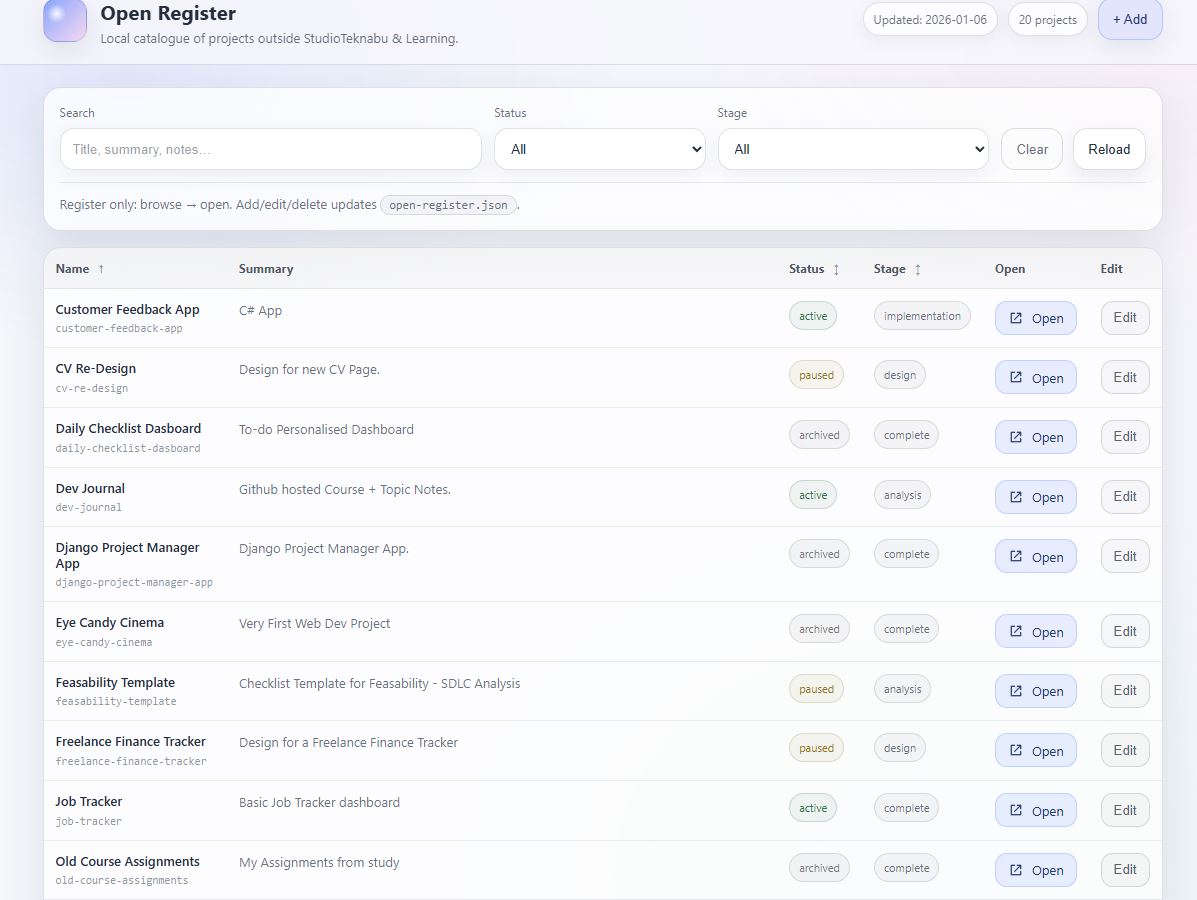
A register view — not a task system.
A place to keep non-core work visible without forcing it into your main tooling.
Table layout so you can see the whole register at once. No digging through cards.
Status + SDLC stage gives you clarity without turning it into a complex workflow.
No accounts, no logins, no syncing — your data stays in a simple JSON file.
Store a project “Home” link (URL or file path) so you can jump straight in.
Add, edit, delete entries from the UI — and the register updates instantly.
Built to stay lightweight and focused — a register, not a productivity platform.
Open Register runs locally using a tiny Node launcher.
The dashboard reads and writes to open-register.json.
start.bat (no terminal habit required).Title — the name you’ll scan forSummary — one line descriptionStatus — active / paused / archivedStage — analysis → completeHome — repo/folder/url jump pointNotes — the why, constraints, remindersShare this page anywhere. When you’re ready, link the buttons below to GitHub, a ZIP download, or a Teknabu project page.
Built as a small, local-first utility. Ideal for “open category” projects that shouldn’t clog up your main workflow.
1) Install Node.js
2) Double-click start.bat
3) Add projects in the UI
4) open-register.json stays portable